Two motherboards and USB power switching
USB sockets usually provide current (and therefore power) to any connected device, regardless of how the software, in particular the OS, detects it. Power switching of a USB connector is not immediate and sometimes even not possible. When the hardware allows such an operation, it can be performed through a dedicated utility: the electrical connection of a socket would be turned on or off, as if the device were physically connected or disconnected, while it is not moved. Two examples of these utilities are:
Each repository must be cloned locally; after building the executable following the README.md instructions, it must be run as root. A list of known compatibile devices is available for both the utilities. In particular, uhubctl mentions motherboard Asus Z87-PLUS. As regards the same-family motherboard Asus Z87-A, some tests are shown below. Later, also Gigabyte Z97X-UD3H is tested.
Motherboard Asus Z87-A
From NetBSD’s usbdevs(8):
addr 0: xHCI Root Hub, vendor 8086
addr 0: xHCI Root Hub, vendor 8086
 addr 19: Microsoft USB Optical Mouse, PixArt
 addr 2: USB Keyboard, Logitech
addr 1: EHCI root hub, vendor 8086
 addr 2: product 8008, Intel
addr 1: EHCI root hub, vendor 8086
 addr 2: product 8000, Intel
Four hubs are present: two hubs labelled as product 8008 and product 8000 (whose parents are EHCI hubs) and two xHCI root hubs.
From NetBSD’s drvctl -tl mainbus0 device tree:
(all childs of pci0)
  xhci0
    usb0
      uhub0
    usb1
      uhub1
        uhidev1
          ukbd0
            wskbd0
        uhidev2
          uhid0
          uhid1
          uhid2
        uhidev0
          ums0
            wsmouse0
  ehci0
    usb2
      uhub2
        uhub4
...
  ehci1
    usb3
      uhub3
        uhub5
From Linux (Ubuntu 18.04):
$ lsusb -t
/:  Bus 04.Port 1: Dev 1, Class=root_hub, Driver=xhci_hcd/6p, 5000M
/:  Bus 03.Port 1: Dev 1, Class=root_hub, Driver=xhci_hcd/14p, 480M
    |__ Port 13: Dev 2, If 0, Class=Human Interface Device, Driver=usbhid, 1.5M
    |__ Port 14: Dev 3, If 0, Class=Human Interface Device, Driver=usbhid, 1.5M
    |__ Port 14: Dev 3, If 1, Class=Human Interface Device, Driver=usbhid, 1.5M
/:  Bus 02.Port 1: Dev 1, Class=root_hub, Driver=ehci-pci/2p, 480M
    |__ Port 1: Dev 2, If 0, Class=Hub, Driver=hub/8p, 480M
/:  Bus 01.Port 1: Dev 1, Class=root_hub, Driver=ehci-pci/2p, 480M
    |__ Port 1: Dev 2, If 0, Class=Hub, Driver=hub/6p, 480M
Devices are numbered in sequence as they appear to the kernel: for example, Port 13: Dev 2. As specified in this post, USB has been designed to be plug-and-play: devices can be connected and disconnected. When a device is disconnected, its device number will not be used by the kernel again, for any other device on that USB controller, to avoid conflicts. If a USB key is connected and disconnected several times, its device number will increase each time.
$ lsusb
Bus 002 Device 002: ID 8087:8000 Intel Corp.
Bus 002 Device 001: ID 1d6b:0002 Linux Foundation 2.0 root hub
Bus 001 Device 002: ID 8087:8008 Intel Corp.
Bus 001 Device 001: ID 1d6b:0002 Linux Foundation 2.0 root hub
Bus 004 Device 001: ID 1d6b:0003 Linux Foundation 3.0 root hub
Bus 003 Device 003: ID 046d:c31c Logitech, Inc. Keyboard K120
Bus 003 Device 002: ID 045e:00cb Microsoft Corp. Basic Optical Mouse v2.0
Bus 003 Device 001: ID 1d6b:0002 Linux Foundation 2.0 root hub
Note that Port 1: Dev 2, If 0, Class=Hub, Driver=hub/8p, 480M and Port 1: Dev 2, If 0, Class=Hub, Driver=hub/6p, 480M in lsusb -t are the ones labelled product 8008 and product 8000 by NetBSD, as clarified by this last lsusb list.
uhubctl only considers these ones:
# ./uhubctl
Current status for hub 2-1 [8087:8000, USB 2.00, 8 ports]
  Port 1: 0100 power
  Port 2: 0100 power
  Port 3: 0100 power
  Port 4: 0100 power
  Port 5: 0100 power
  Port 6: 0100 power
  Port 7: 0100 power
  Port 8: 0100 power
Current status for hub 1-1 [8087:8008, USB 2.00, 6 ports]
  Port 1: 0100 power
  Port 2: 0100 power
  Port 3: 0100 power
  Port 4: 0100 power
  Port 5: 0100 power
  Port 6: 0100 power
This is reasonable. In fact, as confirmed by lsusb -v, such hubs are the only ones having, in Hub Descriptor section:
wHubCharacteristic 0x0009
  Per-port power switching
Their real existence on the motherboard is confirmed by the Intel® 8 Series/C220 Series Chipset Family Platform Controller Hub (PCH) - Datasheet, sect. 5.19, pag. 201.
Despite this, and despite a keyboard and a mouse are connected to the motherboard (as shown by lsusb), none of them is connected to these two manageable hubs, which seem to be not used.
From the Asus Z87-A specifications:
Intel® Z87 chipset:
6 x USB 3.1 Gen 1 port(s) (4 at back panel, blue, 2 at mid-board)
Intel® Z87 chipset:
8 x USB 2.0/1.1 port(s)
This motherboard offers 14 USB sockets. This number is either
- the sum of the available
Ports in hubPort 1: Dev 2, If 0, Class=Hub, Driver=hub/8p, 480Mand hubPort 1: Dev 2, If 0, Class=Hub, Driver=hub/6p, 480M(8Ports + 6Ports); - the total available
Ports inBus 03.Port 1: Dev 1, Class=root_hub, Driver=xhci_hcd/14p, 480M.
Mouse and keyboard do not appear as attached to the hubs labelled product 8008 and product 8000, because any device which is connected to this motherboard will be granted a Port in Bus 03.Port 1 xHCI hub. Even if these USB devices are connected to different places in the motherboard’s PCB, from a software perspective they all belong to in Bus 03. lsusb -t only shows the ones actually connected; the other Ports are powered and working, but not connected to a device. Consequently, being Bus 03 not listed nor by uhubctl, neither by hub-ctrl.c, it seems that power on its 14 Ports is not manageable.
Sockets to Ports mapping
Two of the Z87-A USB 2.0/1.1 Ports are in the back panel. Referring to the above lsusb -t, they appear to Linux Ubuntu 18.04 as:
Port 13: Optical Mouse, case back panel, black row, right socket;Port 14: Keyboard (for some reason, it appears as a device with two interfaces,If 0' andIf 1’), case back panel, black row, left socket.
Their motherboard’s PCB label is KBMS_USB78: they share the metal shield with the keyboard/mouse PS/2 connector.
If a USB device is connected to another physical socket, it gets located by the OS in one of the following:
Port 1: case front panel, right socket (mid-board USB 3.1)Port 2: case front panel, left socket (mid-board USB 3.1)
Cables from the chassis’ front panel must be connected in the motherboard PCB to a socket labelled USB3_12.
Port 3: case back panel, second blue row, right socket (USB 3.1)Port 4: case back panel, second blue row, left socket (USB 3.1)
Motherboard’s PCB label: LAN_USB3_34 (they share the metal shied with the LAN socket).
Port 9: case back panel, first blue row, right socket (USB 3.1)Port 10: case back panel, first blue row, left socket (USB 3.1)
Motherboard’s PCB label: USB3_56.
Port 11: internal 9 pin motherboard USB header (left)Port 12: internal 9 pin motherboard USB header (left)
Motherboard’s PCB label: USB1314.
Port 7: internal 9 pin motherboard USB header (center)Port 8: internal 9 pin motherboard USB header (center)
Motherboard’s PCB label: USB1112.
Port 5: internal 9 pin motherboard USB header (right)Port 6: internal 9 pin motherboard USB header (right)
Motherboard’s PCB label: USB910.
Some basic information about USB headers is provided here. They can be used only through a 9 pin to USB female cable.
The motherboard’s three USB headers labelled (from left to right) USB1314, USB1112, USB910 can be found at the bottom right of this image.
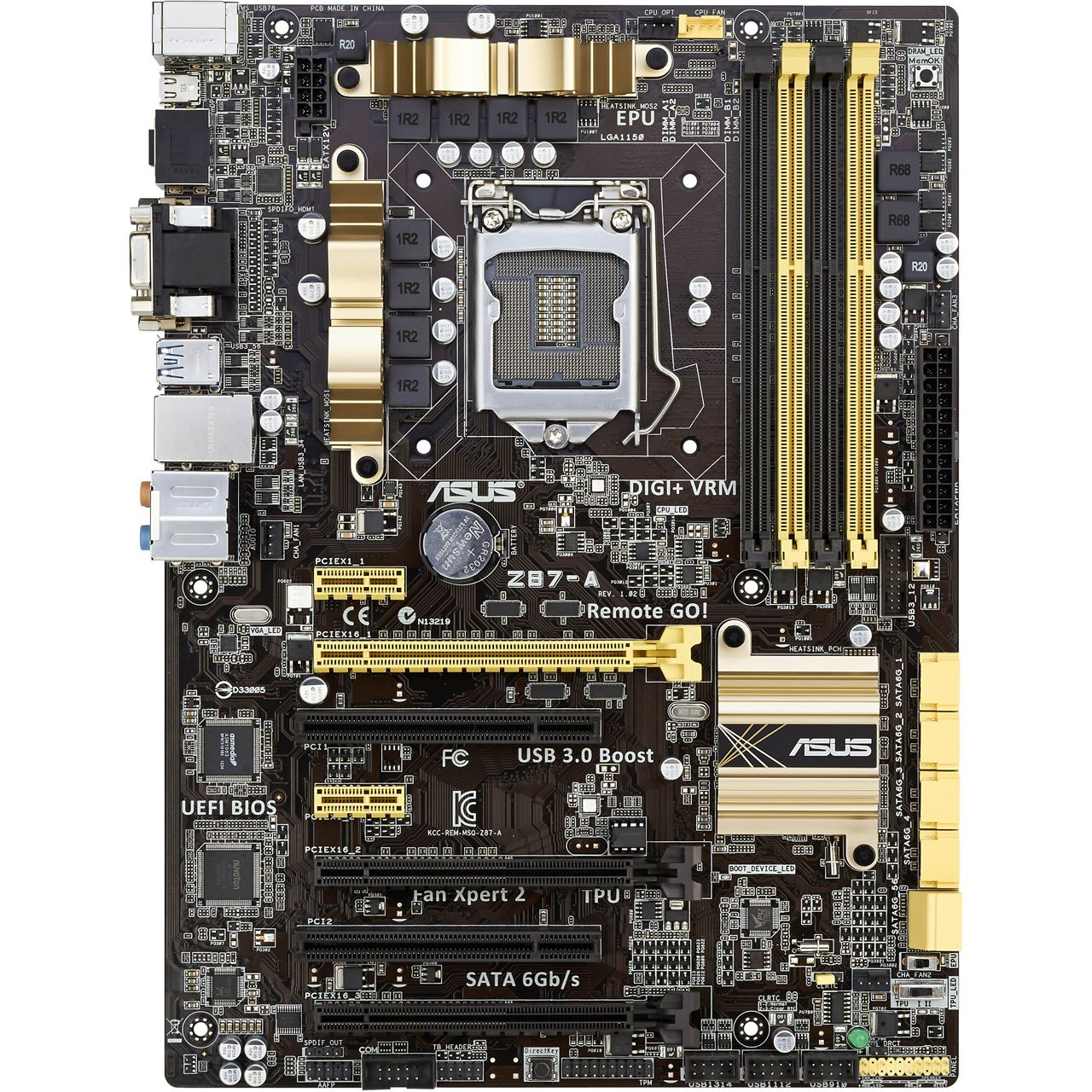
All USB 3.1 sockets are labelled with prefix USB3. All USB 2.0/1.1 sockets are labelled with prefix USB. All 14 motherboard USB connectors are numbered in the labels: sockets 1-6 are USB 3.1, sockets 7-14 are USB 2.0/1.1. It is possible to note that the label number does not always match the software detected Port number. In this example, they match only as regards Ports 1 to 4.
A USB 2.0 key has been used as a probe in these tests. Summarizing:
Label		Port

    1 (USB3)       1
    2 (USB3)       2

    3 (USB3)       3
    4 (USB3)       4

    5 (USB3)       9
    6 (USB3)      10

    7             13
    8             14

    9              5
   10              6

   11              7
   12              8

   13             11
   14             12
Some modifications
Asus Z87-A motherboard BIOS allows the user to customize its configuration.
In Advanced Mode (F7), Advanced, USB Configuration, USB Single Port Control, the user can Enable or Disable the individual USB sockets. Note that the numbers used in the BIOS list are the numbers printed in PCB labels: so, USB_11 in BIOS is related to the internal 9 pin motherboard USB header (center) and it corresponds to Port 7 inside the OS (for example, Linux). Any device connected to a Disabled port will not be detected by the OS: however, the electrical connection between the device and the system is still maintained. Even in this condition, the device keeps receiving power from the motherboard: if it has a battery, it will charge; if it is a lamp, it will light up. This shows that power control on single USB sockets on Asus Z87-A is not possible, even from the BIOS. It behaves unlike the Z87-PLUS.
In Advanced Mode (F7), Advanced, USB Configuration, Intel xHCI Mode, the user can disable xHCI, allowing the EHCI chip to manage all the USB sockets.
Warning: a modification to the BIOS configuration may not be immediately available after “Save changes and Exit” and the subsequent reboot. They may be available after a second reboot or, instead of a second reboot, a shutdown. The xHCI disable has immediate effect after “Save changes and Reset”. Instead, single port Enable/Disable changes require more than one reboot to apply, as well as making unavailable all the USB Ports till the OS starts (Advanced Mode (F7), Boot, Fast Boot, USB Support, Disabled).
Despite being impossible to manage power switching, it is still possible to act on hubs with uhubctl and hub-ctrl.c. When xHCI is disabled by BIOS and only EHCI is used, only the EHCI hubs are working. This feature has been embedded in the motherboard to allow the installation (using a USB mouse and keyboard and/or USB storage) of Operating Systems which do not natively include xHCI drivers, that is: Windows® 7. For this reason, the motherboard is able to run with old-fashioned EHCI controllers only; then, when the OS will be able to handle xHCI driver (after having downloaded them), these controllers can be switched down and replaced with the ones in Bus 03 and Bus 04 (which is able to handle USB 3.1 SuperSpeed circuitry). So, the EHCI controllers and the Bus 03 xHCI controller are separately able to allocate 14 Ports, the first ones acting when the OS can not support a newer driver or when it is disabled by BIOS. This is the reason why, using the defaults, no device had been attached to the EHCI hubs: only the Bus 03 xHCI one was used, and the Bus 04 xHCI one would be used if a USB 3.1 device had been attached.
If xHCI is disabled:
$ lsusb -t
/:  Bus 02.Port 1: Dev 1, Class=root_hub, Driver=ehci-pci/2p, 480M
    |__ Port 1: Dev 2, If 0, Class=Hub, Driver=hub/8p, 480M
        |__ Port 7: Dev 3, If 0, Class=Human Interface Device, Driver=usbhid, 1.5M
        |__ Port 8: Dev 4, If 1, Class=Human Interface Device, Driver=usbhid, 1.5M
        |__ Port 8: Dev 4, If 0, Class=Human Interface Device, Driver=usbhid, 1.5M
/:  Bus 01.Port 1: Dev 1, Class=root_hub, Driver=ehci-pci/2p, 480M
    |__ Port 1: Dev 2, If 0, Class=Hub, Driver=hub/6p, 480M
The following status is shown by uhubtctl:
# ./uhubctl
Current status for hub 2-1 [8087:8000, USB 2.00, 8 ports]
  Port 1: 0100 power
  Port 2: 0100 power
  Port 3: 0100 power
  Port 4: 0100 power
  Port 5: 0100 power
  Port 6: 0100 power
  Port 7: 0303 power lowspeed enable connect [045e:00cb PixArt Microsoft USB Optical Mouse]
  Port 8: 0303 power lowspeed enable connect [046d:c31c Logitech USB Keyboard]
Current status for hub 1-1 [8087:8008, USB 2.00, 6 ports]
  Port 1: 0100 power
  Port 2: 0100 power
  Port 3: 0100 power
  Port 4: 0100 power
  Port 5: 0100 power
  Port 6: 0100 power
This time, mouse and keyboard are attached to Port 7 and 8 respectively. The EHCI hubs are now used and the Bus 03 xHCI hub is not active.
Note that uhubctl does not show the parent hubs Bus 02.Port 1: Dev 1, Class=root_hub, Driver=ehci-pci/2p, 480M and Bus 01.Port 1: Dev 1, Class=root_hub, Driver=ehci-pci/2p, 480M. It only shows the child hubs (where the devices will be attached): as shown in the first lsusb -t, these child hubs are placed on Port 1 of the parent (each parent only have 2 Ports available) and they have respectively 8 and 6 Ports.
New sockets to Ports mapping
As anticipated with mouse and keyboard, Ports are now related to physical sockets in a different way. In hub 1-1 [8087:8008, USB 2.00, 6 ports]:
Port 1: internal 9 pin motherboard USB header (right)-
Port 2: internal 9 pin motherboard USB header (right) Port 3: internal 9 pin motherboard USB header (center)-
Port 4: internal 9 pin motherboard USB header (center) Port 5: internal 9 pin motherboard USB header (left)Port 6: internal 9 pin motherboard USB header (left)
In hub 2-1 [8087:8000, USB 2.00, 8 ports]:
Port 7: Optical Mouse, case back panel, black row, right socket-
Port 8: Keyboard, case back panel, black row, left socket Port 5: case back panel, first blue row, right socket-
Port 6: case back panel, first blue row, left socket Port 3: case back panel, second blue row, right socket-
Port 4: case back panel, second blue row, left socket Port 1: case front panel, right socketPort 2: case front panel, left socket
The division in 6 + 8 of sockets is not between USB 3.1 and USB 2.0. It is between front, back panel sockets (8 in total, 2 in front panel and 6 in back panel, represented by hub 2-1) and internal 9 pin motherboard USB headers (6 in total, distributed in 3 USB headers, represented by hub 1-1).
All these socket to Ports mappings, both in xHCI mode and with xHCI disabled, do not change after a reboot. Moreover, they do not change using NetBSD 8.0 instead of Ubuntu 18.04. They may rely on BIOS information/configuration, which is available to the OS, whatever it is.
Acting on Ports
With xHCI disabled, the output of ./hub-ctrl.c is:
# ./hub-ctrl
Hub #0 at 002:002
 INFO: individual power switching.
 WARN: Port indicators are NOT supported.
Hub #1 at 001:002
 INFO: individual power switching.
 WARN: Port indicators are NOT supported.
To turn off (-p 0) mouse and keyboard:
# ./hub-ctrl -h 0 -P 7 -p 0
# ./hub-ctrl -h 0 -P 8 -p 0
Here, -h 0 refers to Hub #0 at 002:002, which is Bus 002 Device 002: ID 8087:8000 Intel Corp.. Note that, while these actions are successfully completed, after a negligible time Linux immediately reactivates the USB Port, thus restoring its previous “powered” status.
To turn off (-p 0) the device in Port 3 (-P 3), internal 9 pin motherboard USB header (center):
# ./hub-ctrl -h 1 -P 3 -p 0
To turn off the one in Port 4:
# ./hub-ctrl -h 1 -P 4 -p 0
Here, -h 1 refers to Hub #1 at 001:002, which (also according to lsusb) is Bus 001 Device 002: ID 8087:8008 Intel Corp..
Consider a USB key which is inserted in Hub #1, Port 3 (when it is active) and which is detected and mounted by the OS. If it is unmounted, and ./hub-ctrl -h 1 -P 3 -p 0 is run, it will take effect, but even in this case the OS will immediately reactivate the Port, and re-detect (and mount) the USB key. This may depend on the specific OS default configuration and it may be modified.
The same behaviour is shown with uhubctl. Referring to the above shown ./uhubctl listing, to turn off (-a 0) the device in Port 3 (-p 3):
# ./uhubctl -l 1-1 -p 3 -a 0
Current status for hub 1-1 [8087:8008, USB 2.00, 6 ports]
  Port 3: 0503 power highspeed enable connect [03f0:ad07 HP v245o AA04012700008332]
Sent power off request
New status for hub 1-1 [8087:8008, USB 2.00, 6 ports]
  Port 3: 0000 off
The Port will be reactivated by the OS and the key re-detected and re-mounted. Running ./uhubctl without arguments, Port 3 shows up as Port 3: 0100 power, despite it had been successfully deactivated.
# ./uhubctl -l 2-1 -p 7 -a 0
Current status for hub 2-1 [8087:8000, USB 2.00, 8 ports]
  Port 7: 0303 power lowspeed enable connect [045e:00cb PixArt Microsoft USB Optical Mouse]
Sent power off request
New status for hub 2-1 [8087:8000, USB 2.00, 8 ports]
  Port 7: 0000 off
As before, it is not possible to really deactivate mouse, for the same reason.
Despite hub 1-1 and hub 2-1 has been presented in lsusb -v as having Per-port power switching, when they are accessible after having disabled xHCI, it is still not possible to switch the power in their single Ports. Neither from the BIOS this has been possible: in fact, after disabling a single Port, it was unusable in the OS, but it still received power. This may depend on some hardware limitation: there is no circuitry controlling the power (in particular, current) flow from the motherboard to the USB sockets in Z87-A. Despite belonging to the same family, Z87-PLUS provides instead such a feature.
Motherboard Gigabyte Z97X-UD3H
Note that in other motherboards the PCB labels may change (as well as the USB ports availability/distribution). For example, Gigabyte Z97X-UD3H has labels R_USB and R_USB30 (along with USB30_LAN) for the back panel sockets, and F_USB30 for the front panel USB header socket. The remaining 9 pin USB headers are labelled
F_USB2 (left one) and F_USB1 (right one). Rev. of motherboard is written in the lower left corner.
# lsusb -t
/:  Bus 04.Port 1: Dev 1, Class=root_hub, Driver=xhci_hcd/6p, 5000M
/:  Bus 03.Port 1: Dev 1, Class=root_hub, Driver=xhci_hcd/14p, 480M
    |__ Port 9: Dev 2, If 0, Class=Human Interface Device, Driver=usbhid, 12M
    |__ Port 13: Dev 3, If 0, Class=Human Interface Device, Driver=usbhid, 12M
    |__ Port 13: Dev 3, If 1, Class=Human Interface Device, Driver=usbhid, 12M
/:  Bus 02.Port 1: Dev 1, Class=root_hub, Driver=ehci-pci/2p, 480M
    |__ Port 1: Dev 2, If 0, Class=Hub, Driver=hub/8p, 480M
/:  Bus 01.Port 1: Dev 1, Class=root_hub, Driver=ehci-pci/2p, 480M
    |__ Port 1: Dev 2, If 0, Class=Hub, Driver=hub/6p, 480M
Also in this case, two USB 2.0 devices are connected: here, Port 9 and Port 13 are used. Port numbers are not written in Gigabyte’s PCB labels. In Z97X-UD3H, it is not possible to enable or disable a single USB socket from BIOS. The above hubs have the same use as in the Asus example: therefore, the same considerations apply, and the same effects are obtained with uhubctl and hub-ctrl.c when xHCI is disabled from BIOS.